Scooter Style Studio
Reviews
Description
Getting Started with Design
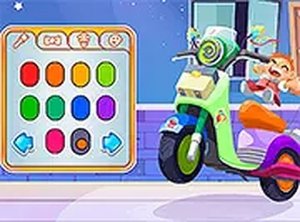
Upon entering Scooter Style Studio, the first task is choosing a headlight shape. This initial selection sets the tone for the entire scooter. The interface is intuitive, with large buttons and clear visuals that make navigation easy for young players. Every choice updates the scooter in real time, providing immediate visual feedback that encourages experimentation.
Customization Options Explored
After the headlight, players can browse a collection of playful stickers. These range from simple shapes to friendly characters, allowing for personal expression. The paint section offers a palette of colors that can be applied to different parts of the scooter frame. Finally, tire selection adds the finishing touch, with several tread patterns and hues available. Each category offers enough variety to keep the activity engaging without overwhelming the user.
No Pressure, All Fun
A key aspect of this activity is the absence of time limits or scoring systems. Children can spend as long as they like on each decision, undoing or changing choices freely. This design philosophy reduces stress and promotes a calm, focused mindset. The lack of failure states means every outcome is a success, which is especially beneficial for younger children who may be easily frustrated by competitive elements.
Sharing and Celebrating Creativity
Once a design is complete, the game provides a simple sharing feature. This allows children to save an image of their scooter and show it to family or friends. Sharing is optional and does not require any personal information or account creation. This feature turns a solitary activity into a social one, encouraging conversation about design choices and fostering a sense of pride in the finished product.
Safe and Accessible for All
Scooter Style Studio runs entirely in a web browser with no downloads or registration. It works on touchscreens and mouse-driven devices alike, making it accessible on tablets, laptops, and desktop computers. The content is carefully curated to be age-appropriate, with no violent themes or complex instructions. This makes it a reliable choice for parents seeking a constructive online activity for their children.







Player Comments
Sign in to comment
You must be logged in before posting a review or rating.
No account? Create one
No comments yet. Be the first to comment!